/ YOUR NEXT MEETING. RIGHT IN SIGHT.
Time to focus.
Time to meet.
Stay focused on your work. Time to Meet reminds you
when it is time to join, right from your Mac’s menu bar.
See it in action ↗
For macOS 14 and later
/ TIME TO MEET!YOUR DAY. WITHOUT THE LINK HUNT.
Until your next meeting04:59
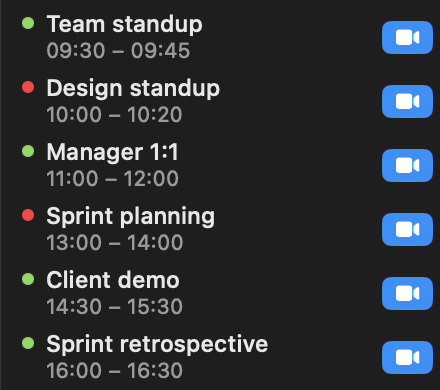
Team standup · 09:30
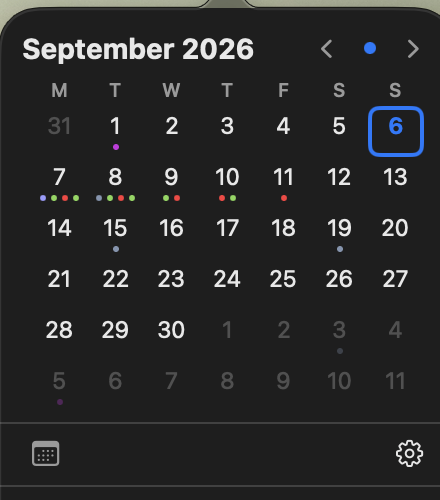
Your month and upcoming meetings in one compact window.
Menu bar countdownFull-screen remindersOne click to joinYour calendar stays on Mac
/ LESS SWITCHING. MORE FOCUS.
Stop watching the clock.
Know when it is time.
01 · BEFORE THE MEETING
Your next meeting.
Always in sight.
Enable the live countdown in your menu bar. See how long you have before the next
call without opening your calendar.
Until your next meeting04:59Time to Meet!
02 · RIGHT ON TIME
A reminder
you will notice.
A full-screen banner before your meeting. Choose when it appears, its colour, sound
and duration, or keep it open until dismissed.
Your meeting is startingDesign reviewJoin meeting ↗Snooze for 1 min
/ FROM CALENDAR TO CALL
The link is already found.
Just join the meeting.
Time to Meet finds call links in the event location and description. When there are
multiple services, each gets its own button.
-
01
Choose your calendars
Select the calendars you need from the Calendar app on your Mac.
-
02
Make reminders yours
Enable the countdown, meeting title and join buttons.
-
03
Join your next call
Zoom and Teams open in their installed desktop apps. Hold ⌥ to open the link in
your browser instead.
YOUR NEXT CALL IS READY
ZoomTeamsGoogle MeetWebex
⌥
Hold when clicking
to open in your browser.
⌥
App or browser
Choose how you join. Add your company’s own video conferencing domains.
◷
Built around your day
Adjust the window size, meeting count, date range and how past events appear.
⌂
Everything stays on your Mac
Meeting contents are never uploaded or stored by the app. No account and no analytics.
/ FAQ
Before your
first call.
Which calendars does it work with?+
Calendars available in the Calendar app on your Mac. Allow calendar access on first
launch, then choose the calendars you want to see.
Which video services are supported?+
These include Zoom, Microsoft Teams, Google Meet and Webex. You can add your own
company domain in settings.
Why is there no join button on the banner?+
Meeting titles and join buttons are off by default. Enable them in reminder settings.
The event must also include a meeting link.
What if my Mac was asleep?+
You can enable catch-up reminders after wake and choose how far back the app should
look for missed meetings.
Which languages are available in the app?+
English, Russian, Spanish, Brazilian Portuguese and European Portuguese.
/ Another app from the same maker
Eversetto
Eversetto guides you through each set, times your rest and tracks your progress. For
iPhone and Apple Watch.
Explore Eversetto ↗